DevOps with Containers
Operating Principle
OS Sharing and Process Isolation
Compared to VMs, Docker containers are based on Linux kernel isolation features:

(source: www.docker.com - Comparing Containers and Virtual Machines)
Starting a container will be faster than starting a VM because:
- Starting a container = starting an isolated process
- Starting a VM = starting a complete OS
Looking ahead: we introduce the container model here in Docker terms, but the practical SE stack from module 03 (Containers) onward runs Podman on RHEL, where the Docker daemon isn't installed. The good news is that
dockercommands map almost one-to-one topodman— which is rootless and daemonless by design — so what you learn here carries straight over.
Using a Layered File System
With Docker, we will find an image concept functionally identical to what we are used to with VMs (e.g., the .box files downloaded by vagrant in the previous section).
The second notable optimization of Docker compared to VMs will be the use of layered file systems ("overlay") to materialize these images.
This approach will allow Docker to optimize the download and construction of images with caching mechanisms.
The Docker Overlay
Isolation mechanisms are not new in the Linux kernel (see LXC - LinuX Containers and cgroups). Layered file systems are not new either.
Docker, however, provides a coherent set of concepts and tools that provide a framework for efficiently building and deploying applications by leveraging these mechanisms.
Key Concepts
Overview of Concepts
The use of Docker will indeed involve manipulating several concepts:
- Images which are functionally equivalent to VM images
- Dockerfile files that describe the construction of an image.
- Image repositories (registry) which allow downloading and storing images.
- Containers which are instances of images behaving like VMs thanks to isolation mechanisms.
- Volumes which allow externalizing container data ("disk mounting")
- Networks which allow communication between containers.
- The Docker daemon which provides an API for managing containers, images, volumes, networks,....
Main Clients
We will primarily use the following command-line clients to communicate with the Docker API:
- The docker executable which will allow individually manipulating images, containers, volumes, networks,...
- Its plugin docker compose which will allow managing stacks in YAML format (services running containers, networks, and volumes,...)
We will mention the existence of graphical interfaces (e.g., Portainer) which are clients of the Docker API. They will not be used in this course for a better understanding of how it works.
Image Repositories
DockerHub
We will find several image repositories providing ready-to-use Docker images. The best known is DockerHub which provides:
- OS images: ubuntu, debian, alpine,...
- Images for services: postgres, mongodb, redis,...
- Images for applications: wordpress, jenkins,...
For deploying GeoStack, we will find there, for example:
- A postgis/postgis image for PostgreSQL deployment with the PostGIS spatial extension.
- Numerous GeoServer images
We will note that using DockerHub to store images will not necessarily be free (cf. docker.com - Pricing & Subscriptions) and that there is a download rate limit per IP or per user.
Other Public Image Repositories
There are other publicly accessible image repositories including:
- quay.io from RedHat, for example, providing the latest versions of Keycloak
- docker.elastic.co providing images for the ELK stack
Thus:
- In the absence of specific instructions, we will use DockerHub (using the
keycloak/keycloakimage will be equivalent to using thedocker.io/keycloak/keycloakimage). - We will specify the domain when using another repository (e.g.,
quay.io/keycloak/keycloak)
Private Image Repositories
It is possible to store images with tools such as Harbor, Nexus or registry deployed on-premise.
Source Code Manager Image Repository
Most source code managers (GitHub, GitLab, Gitea,...) now integrate a Docker image storage system (ghcr.io, registry.gitlab.com,...) which:
- Avoids managing authentication and permissions in parallel at the image repository level.
- Simplifies image publication at the continuous integration orchestrators (which are also integrated into source code managers)
Hosting Provider Image Repositories
Finally, we will mention the existence of image repositories at the hosting solution level (e.g., Google Container Registry, Azure Container Registry, Amazon Elastic Container Registry (ECR)...).
The use of these will sometimes be imposed to use certain functionalities.
NB: A host cannot guarantee that it can redeploy your application in case of a problem if it depends on a third-party infrastructure.
Observability
Application Logs
We will emphasize that application log management is unified by:
- The collection of standard output streams (stdout/stderr) from containers by the Docker daemon (1).
- The presence of a docker logs command allowing retrieval of application logs from a container.
- The presence of several drivers for writing logs (2).
(1) It will of course always be possible to write logs to files, but conforming to the 11th recommendation on Logs of the 12 factors and writing messages to standard streams will simplify their collection.
(2) journald seems particularly interesting for unifying container logs with those of classic systemd services to facilitate their centralization.
System Metrics
Furthermore, we will highlight that Docker will collect system metrics on containers (CPU, memory, disk and network I/O).
These metrics will be available via the Docker API and the docker stats command.
Discover Docker through Practice
Principle
Like Ansible, it would take many sessions to truly train you in the use of Docker. We will content ourselves with an introduction to the main concepts using examples.
To delve deeper into this technology, you can follow a dedicated course or rely on the following resources:
Docker Installation
We will ensure that we have a functional Docker installation allowing us to execute docker run hello-world.
If Docker is not installed on your machine, you can:
- Install Docker on a Linux VM
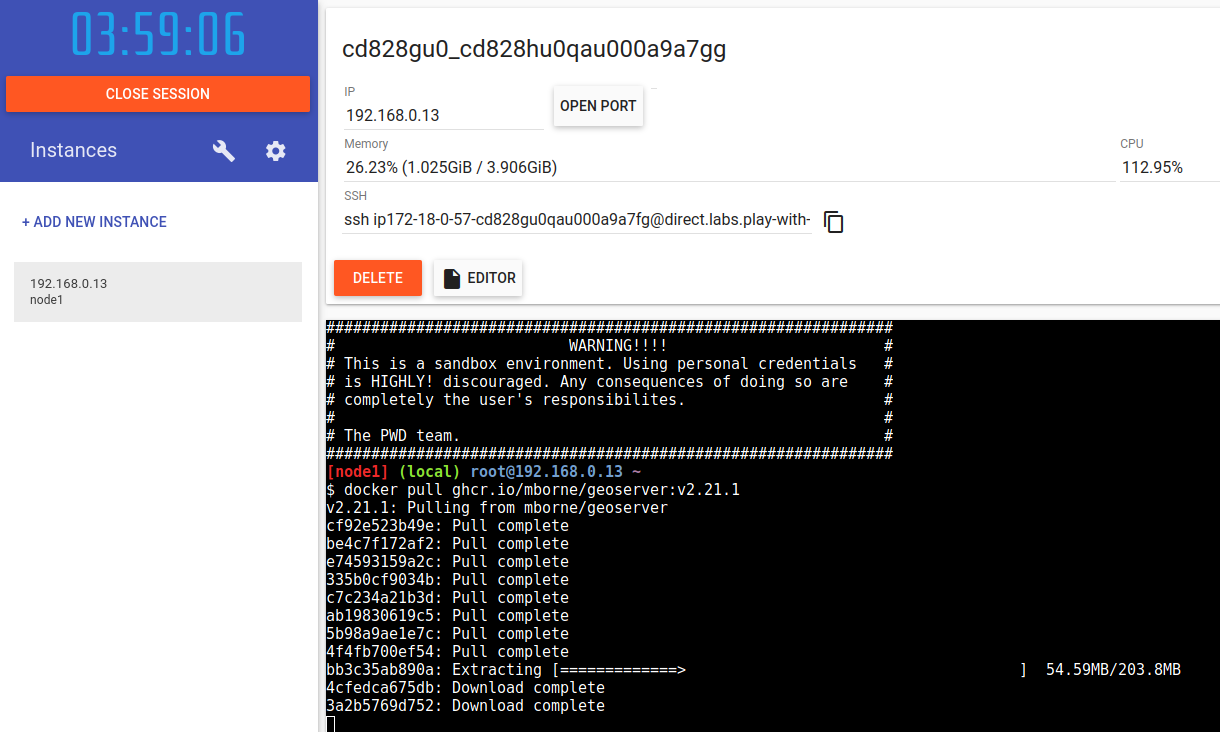
- Use the site labs.play-with-docker.com to do your first online tests (creating a DockerHub account will be required):
Classic Problems
A Docker appendix references the official installation procedure and strives to guide on resolving classic problems.
In particular, you may need to address those related to using an outbound proxy with Docker.
Warning
Avoid installing the Docker daemon directly on a workstation connected to your school/company network.
The default configuration of the daemon (/etc/docker/daemon.json) will need to be adapted to:
- Avoid IP conflicts between virtual networks created by Docker and the local network (
bipanddefault-address-pools) - Define the correct security options (see docker-bench-for-security)
Some Examples to Get Started...
To get started with the docker client and discover the concepts, we will look together at the examples stored in a dedicated repository annexed to this course:
To get started with docker compose, we will use mborne/docker-devbox which is my playground for Docker and Kubernetes by starting (1):
(1) As a prerequisite, you will need to execute
docker network create devbox(the purpose of this will be explained later)
GeoStack Deployment
Principle
After this brief introduction, we can now resume the GeoStack deployment previously carried out with Ansible.
Building an Image
To illustrate the construction of a Docker image from a Dockerfile, we will perform the exercise of:
- Creating the image for GeoServer ourselves
- Storing this image using GitHub Container Registry (ghcr.io)
We will inspect the corresponding repository mborne/docker-geoserver together and emphasize that we can retrieve the image as follows for the next steps:
docker pull ghcr.io/mborne/geoserver:v2.21.1
Deployment with Docker Compose
We will find the corresponding demonstration in the repository below:
mborne/geostack-deploy - GeoStack Deployment with Docker Compose
We will remember that:
- Using a docker-compose.yml file allows starting a complete application stack using the
docker compose up -dcommand. - Without docker compose, we would have to execute numerous Docker commands.
Implementing a Reverse Proxy
With Ansible, implementing a reverse proxy would have involved, for example, installing and configuring Nginx.
With Docker, the presence of an API at the Docker level allows for configuration discovery mechanisms exploited, for example, by Traefik.
We will cover the deployment geostack-deploy - docker - Implementing a reverse proxy to understand how it works.
As an alternative to Traefik, it is possible to use nginx-proxy. The main problem to address would be the same: The LoadBalancer must have access to the exposed containers (hence the "devbox" network at mborne/docker-devbox).
In addition, we will note that Traefik would also facilitate the implementation of TLS and many other points such as the implementation of call rate limits per IP.
The Advantage of Containers
In summary, we will emphasize that Docker's success owes much to the following points:
- The image is a universal deliverable (no longer need to choose between a .deb, .rpm, .war, .zip,...)
- The image is defined as code via the
Dockerfile(thus reconstructible) - The image tested in DEV is the one that runs in PROD
- Container startup is fast.
- Image downloads and builds are optimized.
- A framework is established for observability with application logs and system metrics.
- The API allows the construction of an ecosystem with, for example:
- The reverse proxy Traefik which configures itself automatically by inspecting containers (introspection)
- The UI Portainer which allows starting containers (reflection)
What's Missing at this Stage?
At this stage, if we were looking to host GeoStack on multiple machines, we would notice that:
- Containers on machine A cannot communicate with those on machine B.
- Docker daemons on the machines do not know each other (a tool like Traefik would have to harvest two distinct APIs).
Since containers are an isolation technology with no orchestrator at this stage, we can already run containers on many hosts but have no easy horizontal scalability across them: what's missing is cross-host networking and scheduling.
We will see how to remedy this in the DevOps with Kubernetes section.