DevOps with Kubernetes
Introduction
Container Orchestration
There are several container orchestration solutions that allow for:
- Automation of container management (e.g., restarting in case of a problem)
- Automation of zero-downtime deployments.
- Networking of containers for execution across multiple hosts.
- Automation of scaling.
Swarm
We will highlight the existence of the Swarm orchestration solution, which is integrated into Docker and could, for example, allow:
We will note that the development of Swarm primarily led to the addition of an "overlay" type network to Docker for container communication between multiple machines.
Kubernetes
We will instead focus on Kubernetes, which is a reference in container orchestration and benefits from a rich ecosystem including higher-level abstraction solutions ("serverless") that will not be presented in this course:
Operating Principle
The Kubernetes API
Kubernetes provides an API for controlling container execution at a cluster scale with:
- A declarative approach where the user specifies the objects to create in YAML (or JSON)
- Richer and more numerous concepts than the Docker API
We will see that this API is central to the Kubernetes ecosystem:
- It provides a framework for authentication and rights management (RBAC).
- It allows for introspection (configuration discovery) and reflection (graphical interfaces, operators responsible for deploying applications,...)
- It is extensible (applications can define their own object types)
This API will be central to administering a Kubernetes cluster:
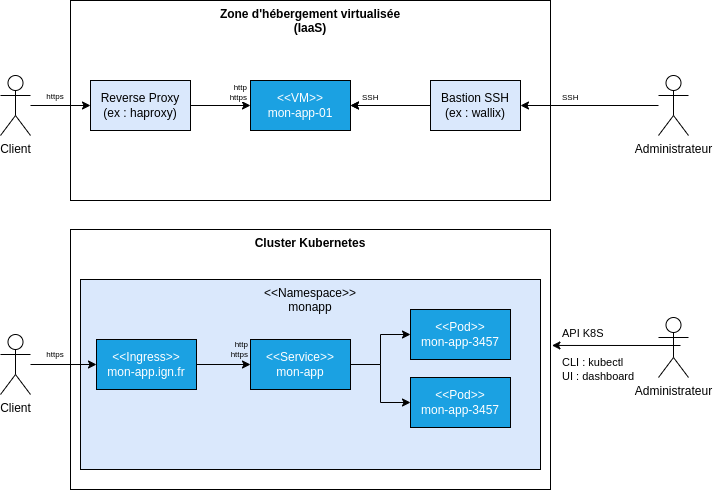
VM vs K8S Administration
Compared to VM administration:
- The kubectl client will replace
ssh. - It will be possible to distinguish objects managed by cluster administrators from those managed by business application administrators.
The Control Plane and Nodes
The control plane hosts the components related to cluster management, including:
- The Kubernetes API (
kube-apiserver) - The API's key/value database (
etcd)
In production, application containers will run on nodes distinct from those hosting the control plane components.
See kubernetes.io - Kubernetes Components for an architectural diagram and more detailed explanations.
An Open Network Model by Default
With Docker, for two containers to communicate, they must share the same network.
With Kubernetes, we will have:
- An open network model by default for communication within the cluster (1).
- The ability to restrict network communications with a dedicated concept: NetworkPolicy.
In this course, we will limit ourselves to noting that using a classic firewall will not allow fine-grained control of network flows (2).
(1) See kubernetes.io - The Kubernetes network model and youtube.com - Understanding Kubernetes Networking. Part 2: POD Network, CNI, and Flannel CNI Plug-in for more detailed explanations.
(2) An external firewall to the cluster will only see the node IPs; it will not be possible to reason at the service level to, for example, enforce the use of an outbound proxy.
Discovering Kubernetes in Practice
Client Installation
To communicate with a cluster, we will install the kubectl client, which will allow us to communicate with the Kubernetes API via the command line.
Creating a Development Cluster
There are various tools for installing a Kubernetes development environment:
- K3S from Rancher.
- MicroK8S from Canonical (Ubuntu).
- Minikube
- Kind (Kubernetes in Docker) (to be avoided for beginners)
We will cover the installation of K3S with Ansible on vagrantbox VMs using the mborne/k3s-deploy repository to link with previous sections.
We could install K3S on a single VM. You can also test mborne/docker-devbox - kind - quickstart.sh once you are familiar with Kubernetes.
Listing Nodes
As a first contact, we can:
- Configure
kubectlto use the cluster deployed on the vagrantbox machines:
# Copy the help displayed by k3s-deploy:
export KUBECONFIG=/home/formation/k3s-deploy/.k3s/k3s.yaml
- List the nodes using the following commands:
# Cluster information
kubectl cluster-info
# List nodes
kubectl get nodes
What now?
We will now be able to progressively discover the main Kubernetes concepts with examples.
Key Concepts
Pods
Pods are the smallest execution unit managed by Kubernetes. They carry the specifications for running one or more containers that share on the same Pod:
- The same network (localhost communication)
- The same storage (access to volumes)
We will cover the examples mborne/k8s-exemples - Pods by linking them to Docker getting started examples to familiarize ourselves with this concept.
We will not detail the use cases of Pods with multiple containers (sidecar, ambassador, adapter) and initialization containers (e.g., downloading data at startup, delaying service startup,...)
Workloads
In practice, Pods are not created manually. Instead, we define workloads adapted to the nature of the application to create Pods:
- A Deployment for a stateless service (e.g., whoami)
- A StatefulSet for a stateful service (e.g., PostgreSQL where each Pod will have its own storage)
- A DaemonSet to run one Pod per node (e.g., fluent-bit for log collection)
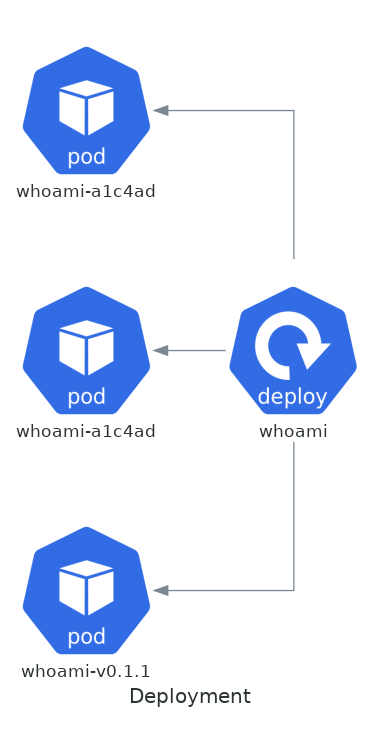
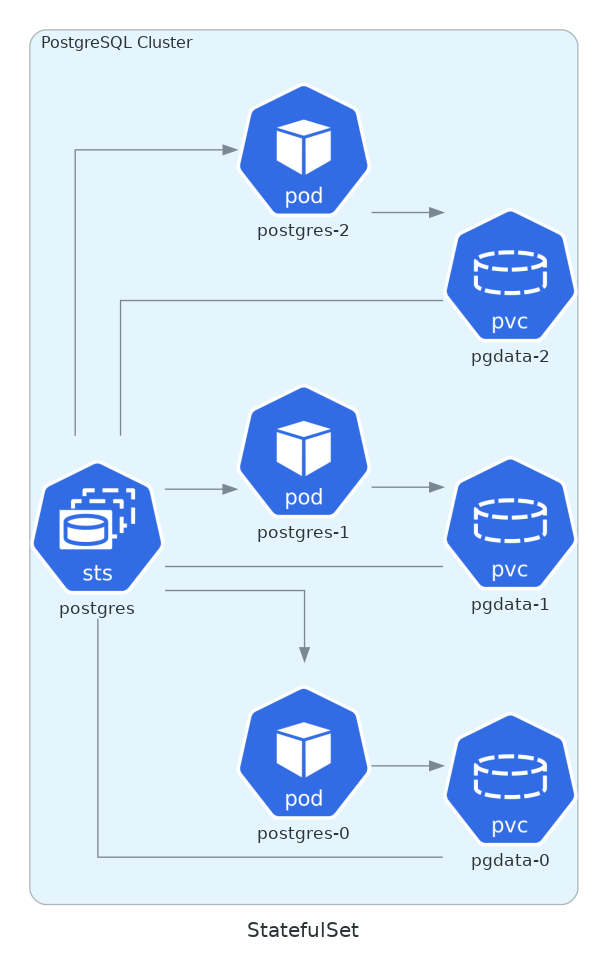
We will cover the first case with mborne/k8s-exemples - Creating multiple whoami Pods using a Deployment.
In addition, we will also highlight the possibility of defining:
We will cover the creation of a Job calculating 2000 digits of PI.
The Service Concept
Initially, a Service can be seen as a reverse proxy in front of the Pods:
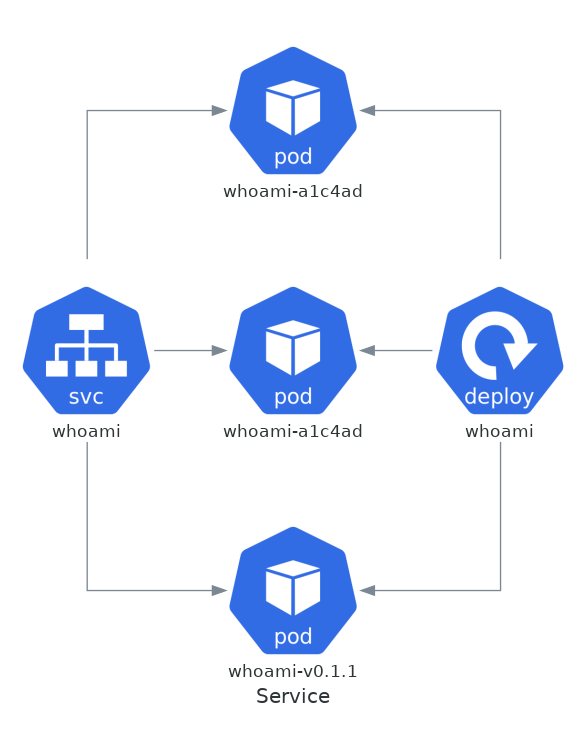
We will cover mborne/k8s-exemples - Creating a whoami service in front of these Pods and observe that a service offers a stable access point to one of the Pods in the cluster (e.g., http://whoami)
We will note that there are several types of services including:
ClusterIPmaking the service accessible within the cluster (default type)LoadBalancerallowing to request exposure on a public IP.NodePortallowing exposure via a port on a node (to be avoided).
We will cover mborne/k8s-exemples - Exposing the whoami service on a public IP to access the service from our machine on a public IP by leveraging the LoadBalancer type (1).
(1) K3S will simulate the publication by exposing the service on the vagrantbox machines. In other contexts (e.g., Google Kubernetes Engine), a public IP would be assigned for our service with traffic routing to the Kubernetes service.
The Namespace Concept
Namespaces allow isolating groups of resources defined within the same cluster. They allow hosting and partitioning multiple applications within the same cluster (Namespace as a service).
We will cover mborne/k8s-exemples - Namespace to inspect existing namespaces including:
- "default" in which we have worked so far without specifying it
- "kube-system" where we will find a service providing DNS resolution (e.g., for the
http://whoamicall tested previously)
We will see how to create and use a dedicated namespace for the whoami application.
The Ingress Concept
The Ingress concept will allow specifying the exposure of a service over HTTP/HTTPS.
Here, we specify the exposure of the "whoami" service on the domain "whoami.dev.localhost":
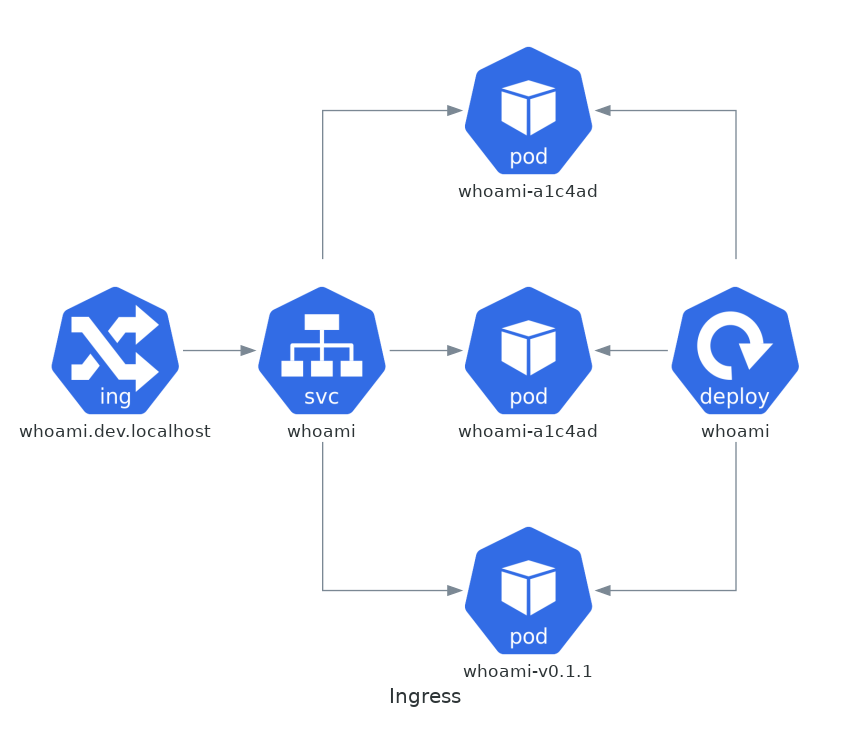
The exposure of Ingress resources will be handled by an Ingress Controller.
We will find several implementations including a Traefik implementation that is installed by default with K3S.
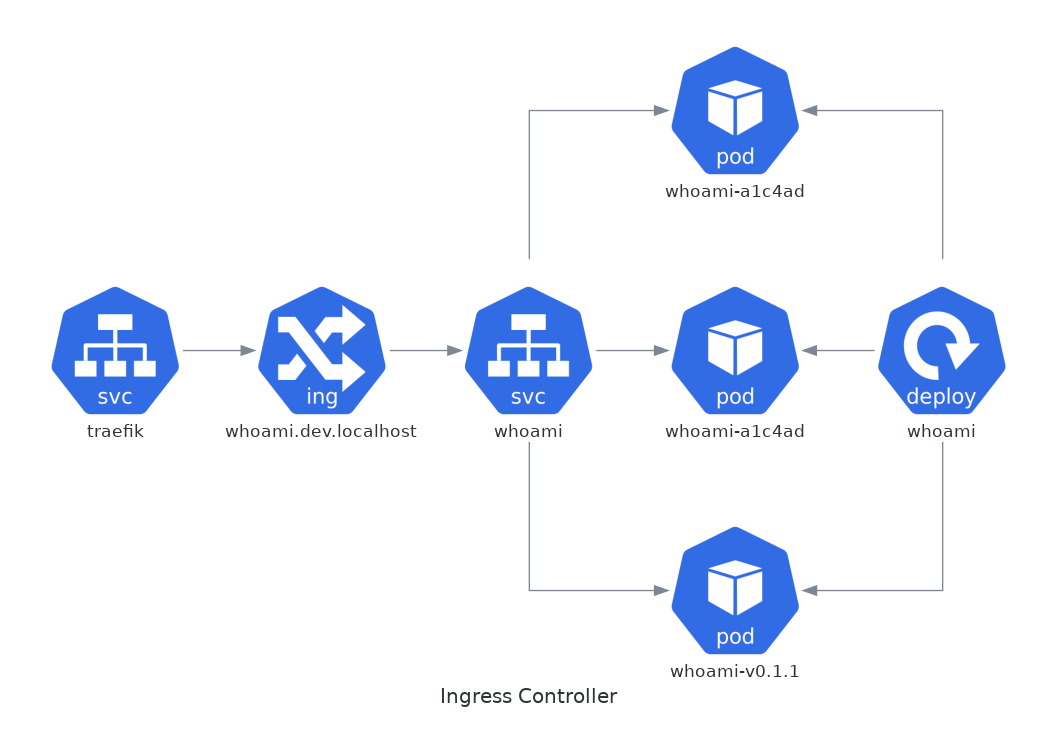
Illustration of Traefik as an Ingress Controller
We will cover mborne/k8s-exemples - Ingress to:
- Verify the Traefik installation handled by K3S
- Expose the whoami service as a URL using an Ingress resource.
Storage and Volumes
We will find the Volume concept, adopted from Docker. However, we will find many complementary concepts allowing:
- Support for a larger number of storage systems.
- Handling different use cases with a distinction between:
- Persistent Volumes
- Ephemeral Volumes (e.g., emptyDir for a cache folder)
- Projected Volumes that map several sources into one directory (e.g., a
serviceAccountToken, or a configMap and a secret exposed together)
We will briefly review the appendix Kubernetes - volumes and storage to note that Kubernetes offers many possibilities in terms of storage but that it is a complex subject.
Operators
For complex deployments, we will find operators that will be responsible for deploying complex applications.
For example, we can use CloudNativePG to deploy a PostgreSQL cluster (see postgis-cluster.yaml).
Deploying GeoStack with Kubernetes
Principle
We will resume the deployment of GeoStack:
- We will use CloudNativePG to simplify PostgreSQL installation.
- We will inspect the YAMLs written to deploy GeoServer without scalability handling (1).
See mborne/geostack-deploy - k8s - Deploying GeoStack with Kubernetes
(1) You can inspect geoserver-cloud which is a textbook case for decomposing a monolith into microservices to facilitate scalability handling and for which the article camptocamp.com - Towards better integration of GeoServer in a cloud infrastructure documents the corresponding work.
Benefits of Kubernetes
A Standardized Framework for the Hosting Zone
In summary, Kubernetes offers standardized concepts for each of the elements to be configured in the hosting zone.
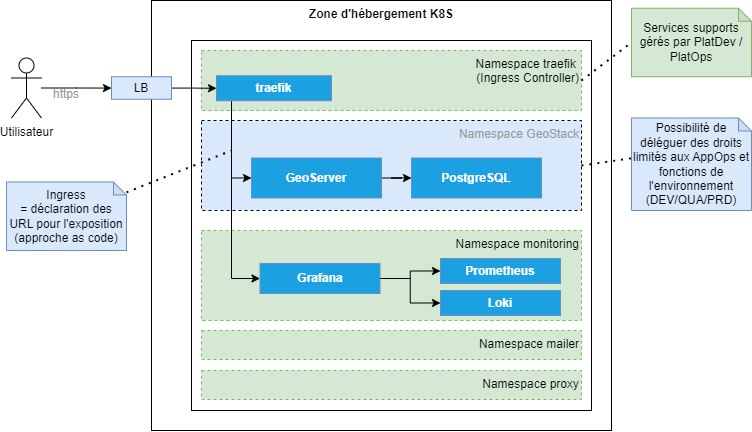
Example of K8S Hosting Zone Architecture
A Framework for Ecosystem Creation
The extensible API provides a framework for developing reusable components across different Kubernetes instances:
- Kubernetes Dashboard
- Prometheus / Grafana / Loki for observability
- ArgoCD, GitLab-CI,... for deployment orchestration
- cert-manager for certificate management
- ...
A Complete Framework for Infrastructure as Code
With an IAAS hosting zone, a partial IaC approach was possible but limiting.
With Kubernetes, we can manage as code:
- The deployment and configuration of technical services (we can therefore effectively manage the proxy and authorized domains using pull-requests).
- The load-balancer configuration (Ingress) (we can therefore deploy a new version without service interruption).
- The firewall configuration (NetworkPolicy) (we can therefore manage network flows more finely without delaying deployments)
- ...
A Framework for Sharing Responsibilities
With an IAAS hosting zone, it was difficult to go beyond an approach like the following, leading to management conflicts:
- PlatOps are "sudoers" on all VMs
- AppOps are "sudoers" on application VMs
With Kubernetes, the presence of a REST API allows for much finer management of rights as code:
- AppOps have rights only on their application namespaces
- AppOps have limited rights on different types of Kubernetes objects in these namespaces (e.g., ability to view firewall rules (NetworkPolicy) without the ability to modify them)
What's missing at this stage?
Kubernetes is not a turnkey solution
At this stage, we will emphasize that Kubernetes is not a solution offering a turnkey hosting zone. For example, it will be necessary to deploy, configure, and operate technical services (e.g., Ingress Controller, Prometheus, Grafana...).
Distributions and Managed Offerings
We can limit efforts on certain points with richer distributions (e.g., Rancher, VMWare Tanzu,...) or by using Kubernetes as a SaaS (Managed Kubernetes Service at OVH, Google Kubernetes Engine,...) but:
- Efforts will vary depending on the choice (e.g., fluent-bit will be automatically deployed to feed Google Cloud Logging with GKE)
- There will always be choices to make regarding rights management (e.g., on which environment to grant rights to DEV?), users to manage, and a system and costs to monitor.
Securing Container Execution
To secure container execution, we would still need to configure security options on containers.
However, activating certain options is not painless for applications. For example, to run containers as non-root, you must:
- Use non-privileged ports (using port 80 will cause problems).
- Properly manage file permissions within the container.
Controlling System Resource Consumption
We would also need to specify RAM and CPU reservations and limits for containers to:
- Allow the implementation of autoscaling on nodes.
- Prevent a service from consuming all CPU and RAM resources of a node.
It would also be necessary to ensure that a Pod does not cause a full disk on a node, for example by:
- Setting a read-only root filesystem (
readOnlyRootFilesystem: true) — a container security option that stops the application from writing to the container's own filesystem. - Enforcing the declaration of explicit volumes for any local storage the application genuinely needs.
- Enforcing the declaration of limits via the implementation of quotas on local storage.
Kubernetes is not magic!
Kubernetes provides a framework for the coexistence of containerized applications (resource consumption limits, security options,...).
However, it is up to the user to leverage this framework by adhering to a set of best practices in container creation and execution to benefit from a good level of security and high availability (1).
(1) NB: Automatic Pod restart mechanisms in case of problems will limit the effects of certain types of problems (e.g., reaching RAM limit). Intervention will be required for others (e.g., full disk on a node).
Kubernetes does not produce production-ready containers!
In essence, Kubernetes will not free developers from the need to produce "prod-ready" containers.
The use of Kubernetes will instead impose good control over RAM consumption and rigor in data management.
Kubernetes is not the solution to all problems
It should also be noted that:
- Deploying and maintaining "Stateful" applications such as databases in a Kubernetes environment is not trivial and will require mastery of storage with Kubernetes.
- Kubernetes is a low-level solution that will be less efficient than a PaaS or SaaS offering for deploying certain applications (e.g., CMS, static site,...).
In this regard, we will take a step back in the DevOps in the cloud section and discuss the possibility of hybridizing solutions.